PER8 Digital Watch Face
PERSONA Watch FacePersonalization
4.0121.00 Reviews
- Version
- Varies With Device
- Installs
- 10.00K
- Age Rating
- Everyone
Screenshots
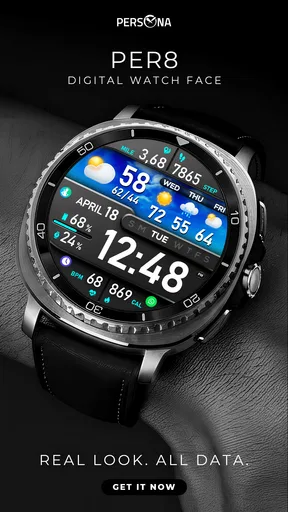
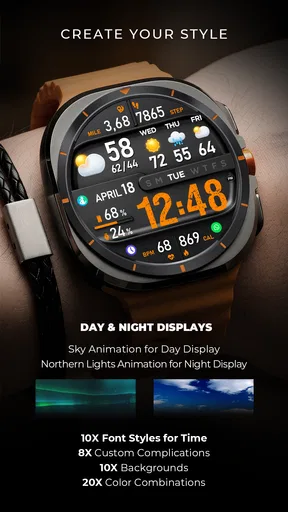
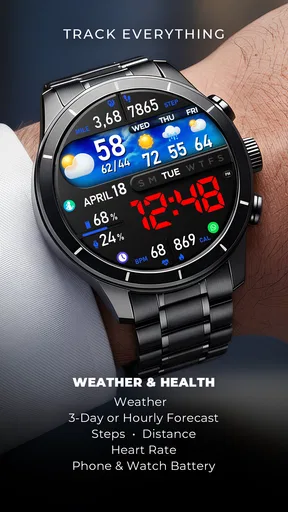
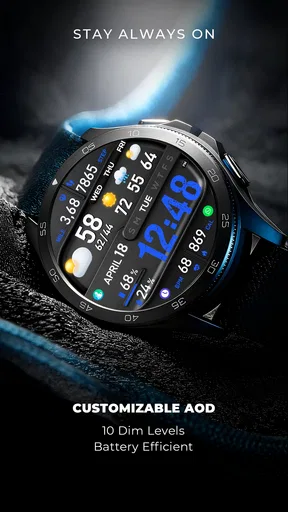
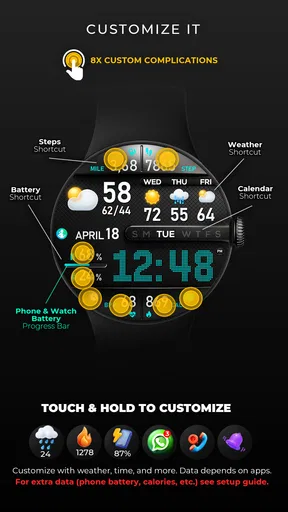
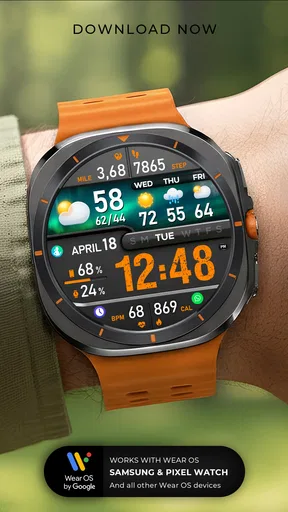
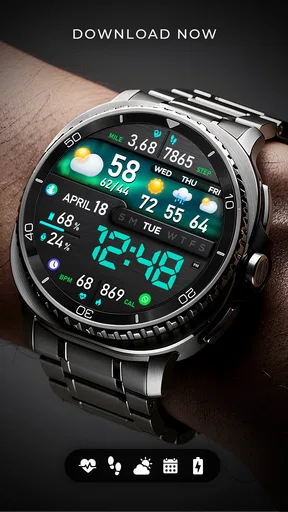
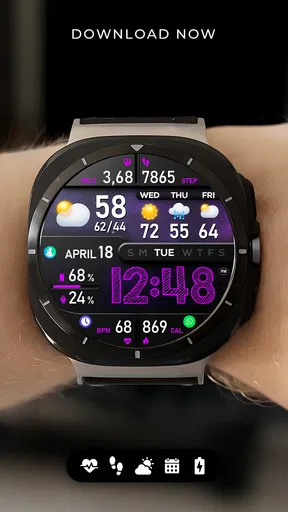
Our Review of PER8 Digital Watch Face
 Analysis by Appyee
I tend to judge a watch face by what happens after the first day: whether I can read it quickly, whether its information earns the space it takes up, and whether I still like looking at it once the novelty wears off. PER8 Digital Watch Face is aimed at people who want a digital look with room to make it their own. It comes from PERSONA Watch Face, sits in the personalization category, and is made for Wear OS rather than as a general phone display.
That focus matters. A watch face is something you glance at repeatedly, often while walking, carrying bags, or trying not to interrupt a conversation. The useful question is not simply whether it looks striking in a screenshot, but whether its layout works at a glance and fits the way you actually use your watch. My overall impression is that PER8 is most appealing when you choose a small amount of information and a clear visual style, rather than trying to make the face show everything at once.
A practical routine for the first day
I would start by treating setup as a short test rather than a full customization project. Install the face, put it on your watch, and use its default arrangement for ordinary tasks before changing several things at once. Check the time while standing outdoors, glance at it indoors, and see whether the digital display is easy to parse when you only have a moment. That simple baseline helps you tell whether a later adjustment actually improves readability.
The app costs $2.99, has an Everyone age rating, and has been available since February 21, 2022. It has a 4.0 average from around 550 ratings, with over 10,000 installs. Those figures make it a familiar paid option rather than an unknown experiment, but I would still decide based on the face’s look and your preference for customization. If you already enjoy changing the appearance of your watch, the purchase is easier to justify than if you are content with the face that came with your device.
First Impressions and Setup
First up, downloading and setting up the PER8 Digital Watch Face was a breeze. I headed over to the app store, found the app, and it was up and running on my smartwatch in no time. The installation process is straightforward, and you don’t need to be a tech wizard to figure it out. Once installed, you’re immediately greeted with a sleek, modern interface that promises a lot of customization.
Customization Galore
Alright, let’s dive into the fun part—customization! This app doesn’t hold back when it comes to letting you tweak and tune the watch face to your liking. From colors to widgets, you can change almost everything. There’s a nifty palette of colors, so whether you’re feeling bold or minimalist, you’ve got options. I went with a classic black and neon green combo, and it looked absolutely stunning.
One of the standout features is the ability to add widgets. You can display the weather, your step count, battery status, and more, right on the watch face. It’s super handy to have all this info at a quick glance. Plus, the app allows you to rearrange these widgets with a simple drag-and-drop interface, which is really intuitive.
Make the layout earn its space
For a more useful setup, I would choose widgets according to a specific routine instead of treating every available slot as a place to put something. If your watch is mainly a step-count companion, prioritize that glance and keep secondary information to a minimum. If you check the weather before leaving home, that detail may be more valuable than another number you rarely act on. The face becomes easier to scan when each displayed item answers a question you genuinely ask during the day.
There is also a practical trade-off between personal style and contrast. A vivid color can make the design feel distinctive, but a high-impact accent is most useful when it helps separate important elements from the background. I would try a preferred color in both bright and dim surroundings before settling on it. If the time is the first thing your eye finds, the color choice is doing useful work; if decorative elements compete with it, a quieter palette may suit daily wear better.
Drag-and-drop rearranging is worth approaching with a plan. Move one item at a time, then wear the face through a normal stretch of the day before changing anything else. That makes it easier to identify whether a position is genuinely convenient or merely looks balanced in the editor. A layout that reads neatly in a still preview may feel different when you are checking it with one hand while moving, so real-world glances should be the final test.
Performance and Usability
Now, what good is a watch face if it lags or drains your battery, right? I was pleasantly surprised to find that PER8 Digital Watch Face performs smoothly. I didn’t notice any lag or delay when switching between screens or when the watch face was loading updates for my widgets. It’s optimized to keep things running efficiently, which is a big plus.
Battery life is always a concern with smartwatches, but the app seems to be designed with efficiency in mind. I didn’t notice any significant drain on my watch’s battery during my time using it, which is a relief. It’s nice to have something that looks good and doesn’t compromise on performance.
Habits that make quick checks quicker
The strongest workflow for a glance-based face is repeatability. I would settle on a consistent placement for the information I check most, then let that arrangement become familiar. When the same item is always in the same part of the display, I can look briefly rather than search across the face. This is especially helpful during a commute or while carrying groceries, when I want to check the time or a step count without stopping to study the screen.
For a realistic day, imagine leaving home in the morning, checking the weather before choosing a jacket, and then glancing at steps during a lunch break. A focused arrangement can support those small decisions without turning every glance into a miniature dashboard review. In the evening, I might care more about battery status before heading out again. The useful choice is not to keep changing the layout for every moment, but to select a few details that reliably help across the day.
If you are comparing PER8 with a basic face already on your watch, the main reason to switch is the combination of digital styling and the ability to tune colors and widget placement. A plain built-in option may be better if you want the least possible setup or prefer a familiar, restrained display. PER8 is not automatically the better choice simply because it offers more ways to personalize; the advantage depends on whether those choices make your own quick checks clearer.
Settings worth checking before settling in
I would pay particular attention to the relationship between the background, accent color, and the information you have chosen to show. Try the face with fewer widgets first, then add only the items that change a decision or save you a trip into another screen. Weather, steps, and battery status can each be useful, but their value depends on your routine. A runner may care about steps more than someone who uses a watch mainly for notifications, while a person heading out for the day may find weather more immediately actionable.
It is also sensible to check the watch’s own display behavior alongside the face. A watch that dims or changes how it presents information can affect the way a carefully chosen color scheme reads. I would assess the time in the conditions where I use the watch most, not just in a bright room while adjusting settings. If readability is your priority, choose a high-contrast arrangement and avoid adding visual detail simply because it is available.
One question buyers often have is whether this is a phone app or a wearable-focused choice. Its purpose is a Wear OS watch face, so I would consider it specifically for a compatible watch and not expect it to function as a general-purpose phone personalization app. Another practical question is whether the purchase makes sense for someone who rarely changes watch faces: if you want one dependable default and do not care about color or widget arrangement, the built-in choice may be enough.
Style Meets Functionality
Let’s talk style. I mean, who doesn’t want their tech to look chic? The design of the watch face is modern and dynamic. The digital design is sharp, and the attention to detail is evident. It’s not just about aesthetics, though—it’s about marrying form and function. The app does a fantastic job of offering a design that’s easy on the eyes and practical for everyday use.
What I love most is that it doesn’t feel cluttered despite having so much information on display. It’s a testament to the thoughtful design that it manages to keep everything readable and accessible.
Where the flexibility has limits
More options do not remove the basic limits of a watch screen. Even a well-arranged face has less room than a phone, and a dense display can make quick reading harder. I would skip an information-heavy setup if I mainly want an uncluttered time display, or if I find myself repeatedly pausing to interpret small details. In those cases, a simpler face is a better tool, not a less capable one.
There is also a difference between changing a face because it supports a habit and changing it because the editor makes experimentation tempting. The former can save time; the latter can leave you with a layout you keep adjusting but never learn to read instinctively. My advice is to make a deliberate first arrangement, live with it through a few ordinary routines, and only revise the element that proves inconvenient. That keeps personalization useful rather than turning it into ongoing maintenance.
On the battery question, my experience was reassuring, but I would not treat that as a guarantee for every watch or every configuration. A face showing more information may behave differently from a minimal setup, and battery life depends on the watch as well as what is displayed. If battery endurance is your main concern, begin with only the details you need and judge it during your usual day before adding more.
Wrapping It Up
So, would I recommend PER8 Digital Watch Face? Absolutely! Whether you’re a tech-savvy individual looking to pimp up your smartwatch or someone who just wants a clean, functional watch face, this app has something for everyone. The customization options are extensive, performance is smooth, and it doesn’t hurt that it looks pretty darn cool.
In a world where personalization is key, having an app like this that lets you express your style while keeping you organized is a win-win. So, go ahead, give it a whirl, and let your wrist do the talking!
My verdict after living with the idea
I would recommend it most to someone who enjoys a distinctive digital look and has a clear reason to adjust the face: perhaps a preferred accent color, a step count they check often, or weather information that helps with daily plans. It is less compelling for someone who wants a completely hands-off setup, values a bare display above all else, or expects a watch face to replace a more detailed app. In those cases, a basic built-in face or opening the relevant app when needed may be the more comfortable option.
The best way to get value from it is to keep the setup modest, arrange the most useful glance where it is easy for you to find, and then stop tinkering once the face fits your routine. That is where its personalization feels purposeful rather than ornamental. For me, PER8 is a worthwhile choice when I want my watch to look more individual without giving up at-a-glance utility, provided I am willing to spend a little time deciding what actually belongs on the screen.
Verdict
Strengths of PER8 Digital Watch Face
- Highly customizable watch face options.
- Clear and easy-to-read digital display.
- Battery-efficient design for longer use.
- Seamlessly integrates with fitness tracking.
- Supports multiple languages for global users.
Limitations of PER8 Digital Watch Face
- Limited compatibility with older devices.
- Some features require in-app purchases.
- Occasional sync issues with some models.
- Minimal support for third-party apps.
- No offline mode for certain functionalities.
Other Releases by PERSONA Watch Face
View All
PER12 Digital Watch Face
Personalization3.6

PER32 Ultra Hybrid Watch Face
Personalization4.1

PER23 Digital Watch Face
Personalization4.1

PER27 Digital Watch Face
Personalization4.2
Similar Picks in This Category
View All
Microsoft SwiftKey AI Keyboard
SwiftKey4.3

Wallpapers
Google LLC4.1

Zedge™ Wallpapers & Ringtones
Zedge4.7

Yandex Browser with Alice AI
Direct Cursus Computer Systems Trading LLC4.3

Ringtone Maker:create ringtone
Big Bang Inc.4.7

Fonts Keyboard
Fonts Keyboard3.9
Frequently Asked Questions
What features does the PER8 Digital Watch Face offer?
The PER8 Digital Watch Face provides a comprehensive suite of features designed to enhance your smartwatch experience. It includes customizable time displays, weather updates, step tracking, heart rate monitoring, and notifications. Users can personalize colors and layouts, ensuring a personalized and efficient interface that meets their daily needs.
Is the PER8 Digital Watch Face compatible with all smartwatches?
The PER8 Digital Watch Face is compatible with most Android smartwatches that support Wear OS. However, it’s essential to check the specific compatibility with your device model on the Play Store before downloading. Compatibility with iOS devices is not supported, as it is designed specifically for Android systems.
How user-friendly is the PER8 Digital Watch Face?
The PER8 Digital Watch Face is designed with user-friendliness in mind, offering an intuitive interface that is easy to navigate. Users can effortlessly customize settings and access various features with just a few taps. The straightforward design ensures that even those who are not tech-savvy can use the watch face without difficulty.
Does the PER8 Digital Watch Face impact battery life?
While the PER8 Digital Watch Face is optimized for performance, it can have a moderate impact on battery life depending on how many features are active. Users can manage battery consumption by adjusting settings such as screen brightness and update frequency for weather and notifications, ensuring a balance between functionality and battery preservation.
How can I customize the PER8 Digital Watch Face?
Personalizing the PER8 Digital Watch Face is straightforward. Users can customize elements such as color themes, widget layouts, and the type of information displayed like weather, steps, or heart rate. This customization is accessible through the settings menu, allowing each user to tailor the watch face to their personal style and needs.
